Example completion recordCleaning and disinfection of line 3
- Employee
- Anna K., shift II
- Completed
- 14 Jul · 06:42
- Test
- 8/8 correct
- Source
- SOP-14 ver. 5
Training completed
Procedure training. Early Access.
Add a procedure, request a lesson and test draft, then review it and get authorised approval. Assign the training to your team. Results, dates and document versions stay in one report, so you can see who needs support without piecing records together.
14 days with no charge, up to 10 people. Card required. A paid plan starts after the trial unless you cancel first.

Training completed
Admin that interrupts the team
When an attendance sheet lacks the procedure version or test result, each change brings another round of checks about who needs training, often just before an audit. Those checks take time you could spend answering the team’s questions.
An out-of-date list
People leave and new people join. When the list falls behind, you rebuild it from email before an audit. Keep assignments and completion records aligned with the current team, so the next onboarding starts with helping the new person.
Attendance alone
The attendance list records participation; a test checks answers to specific questions. Keep both records and use the answers to decide what to explain again. A signature alone does not prove a practical skill.
A revised document
An updated instruction in an email does not update earlier training. Link the material to its version and check who needs the revision. That gives you a clear starting point for explaining the change to the people affected.
How it works
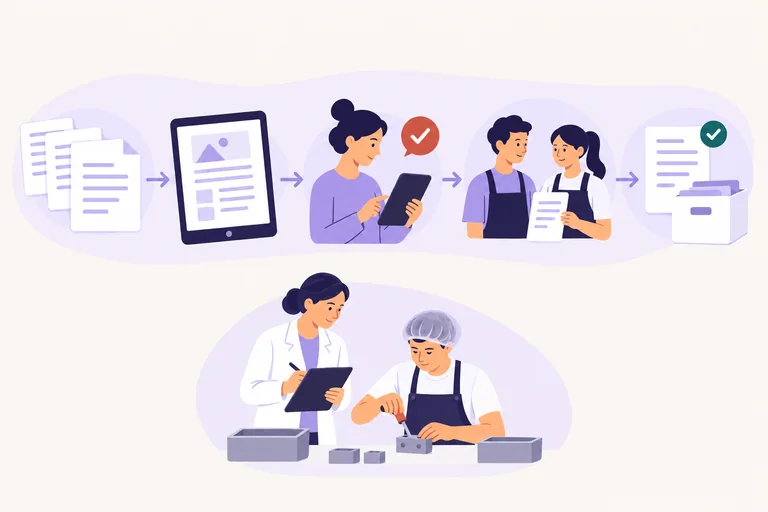
Add the material, review the draft and assign the training. Check that the report gives you the evidence you need, then use the results to decide where your team needs a conversation or practical support.
Start with an instruction, procedure, policy or incident note you already use. Upload a PDF or Word file, or paste the text.
Request a short lesson and check questions tied to the source and version. Use the draft as a starting point for your review.
Correct errors and review the questions before assigning the material. Where an independent review is required, the author cannot approve their own work.
Check completions, scores, overdue items and versions in one place. Follow up where support is needed, without first searching several files.
CrewShift connects the source document and version with approved material, assignment, result and completion date. You can reconstruct what someone was expected to learn and which version applied without collecting the same evidence from several places. Use that clarity to plan follow-up with the person. A green status or certificate does not automatically establish competence to perform the work.
For a simple change, an acknowledgement may be enough. Another may require a knowledge check. A practical or higher-risk task can also require observed performance, formal authorisation, a licence or a manager’s decision. Keep those events distinct: each answers a different question. Clear criteria let a leader focus the conversation and avoid asking people to repeat checks that do not address the actual risk.
Start with the criterion that needs to be met, then choose the material, assessment method and deadline. A procedure revision should create a new assignment only for the groups genuinely affected, while the previous version’s history stays intact. Keeping that scope clear limits unnecessary administration and gives the leader a useful basis for explaining the change, checking understanding and supporting practice.
Assess impact, identify people affected by the new version and keep source, material, questions and result linked. Focus follow-up on what changed.
Read the guideUse the matrix as a view of current requirements and evidence. Avoid a second manual register and see where someone needs follow-up.
Read the guideA test shows knowledge within its scope. Practical work may need a separate effectiveness or authorisation criterion before you decide what support comes next.
Read the guideCheck the required population, material version, exceptions, results and history alongside completion totals. Use the detail to decide who needs follow-up.
Read the guideTry the whole process on one procedure and check the effort it takes to prepare, track and follow up.
Try it with your procedureControl without retracing the work
Artificial intelligence prepares a draft only when you request it, and it can make mistakes. Review the content and have a person with the required permission approve it before publication. A clear approval trail helps the next person see what was checked without asking you to reconstruct the process.
Example data. Drafts and published materials have separate statuses.
The audit report
The report links each person to a result and material version, so you can check records together and prepare a focused follow-up. The data below is an example. Completing training alone does not establish practical competence.
| Employee | Team | Completed | Score | Version | Status |
|---|---|---|---|---|---|
| Anna K. | Production, shift II | 14 Jul, 06:42 | 8/8 | ver. 5 | Passed |
| Marcin W. | Production, shift I | 13 Jul, 14:05 | 7/8 | ver. 5 | Passed |
| Iryna S. | Packing | 15 Jul, 08:11 | 8/8 | ver. 5 | Passed |
| Tomasz B. | Maintenance | — | — | ver. 5 | Reminder |
Check completions, scores and overdue items before an audit, then focus conversations on the gaps.
Assign the right training to a new employee, then spend onboarding time explaining the work.
See which shift still needs the revised training and where the team needs your support.
Pricing
Every plan includes the same features. The limits for people and artificial intelligence usage differ. Monthly prices exclude VAT. Early Access includes a 50% discount.
Test one real procedure and the admin it creates.
Up to 10 people · 100,000 AI units
One site or team keeping training and reports together, with less record chasing.
€89 · save €44.50
Up to 49 people · 1,000,000 AI units
A larger team handling regular procedure changes, training and follow-up in one place.
€229 · save €114.50
Up to 200 people · 5,000,000 AI units
Questions
Phone access, data import, signatures and charges after the trial. Check how these fit your team and the administrative work you need to reduce.
Yes. Register your organisation, choose a plan and start the 14-day trial yourself. Use one procedure and a small group to check how the work fits your day. A Visa, Mastercard, or American Express card is required, but no charge is made during the first 14 days.
Training opens in a phone browser. An employee receives short training material and a test without installing a separate app on the device. Check access with your team first, so time together can go into questions about the work.
You can export and print the report using the recorded training data. If a regulation, customer or internal procedure requires a handwritten signature, CrewShift does not remove that obligation. It keeps the data together so you can prepare the document without collecting it again from several files.
It depends on the length and quality of the source document. Test the actual preparation time on a real procedure during the trial, including review and approval. Also compare the effort of checking completion afterwards: a useful draft is only part of the work you want to reduce.
The import scope depends on the spreadsheet layout. During the trial, start with a small group and check the required format before moving a larger list. Confirm who will maintain assignments and records, so your team does not end up updating the same information twice.
A certificate confirms completion of specific training under recorded rules. It is not an employee assessment and should not determine an employment decision on its own. Use the result to identify topics for a conversation or practical check, then apply the criteria relevant to the work.
If you do not cancel, your selected paid plan begins under the terms shown during registration. Choosing Trial leads to Professional; choosing Advanced leads to Advanced. Check the plan and price before entering your card. You can cancel before the trial ends.
Start with one procedure
Choose a current procedure, prepare the training and assign a small group. During the 14-day trial, check the report and compare the time you spend preparing materials, checking completion and chasing records. Use that evidence to judge whether CrewShift frees time for coaching your team.